
Kitchen display
Kitchen screens show each ticket by station, with timers.
Updated November 20, 2026
What it does
Kitchen screens show each ticket by station, with timers. Cooks tap to mark items done and the order moves along.
Turn it on
- Open Modules in the dashboard menu.
- Find Kitchen display in the list and switch it on.
If your plan does not include this module, its card has no switch. Click Request this module and our team will get back to you. See Turn modules on and off.
Use it day to day
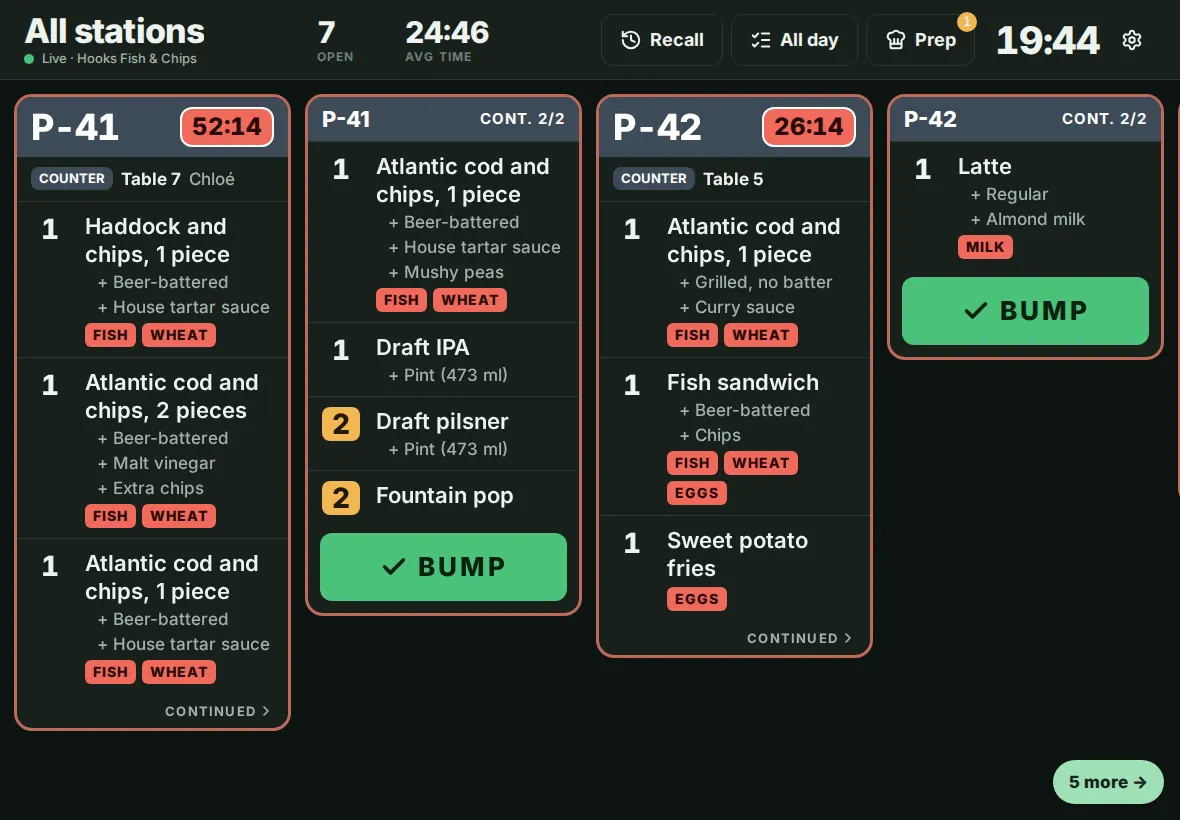
- Pair a tablet and choose Kitchen display mode. Pick the stations it shows (Stations shown on this screen).
- Each ticket has a timer. It turns amber after 8 minutes and red after 12, then flashes after 15.
- Tap an item to cross it off. Press BUMP on the ticket when the order is ready. Recall brings back a bumped ticket, and All day totals what is open.
- Orders that are bumped show as ready on the Order hub.
Expo screen
An expediter can see every station's part of a ticket on one screen.
- Pair a kitchen display to your Expo station, or, on a display with no stations, tap Expo in its header (it appears when your location has an Expo station).
- Each ticket lists its items under the station that makes them. A station shows Waiting, In progress or Done with the time it finished. The timer uses the same colours as the kitchen screen.
- For table service, items show their course, and courses that are held or not yet fired appear under Coming up.
- When every station is done the ticket turns green. Press RUN to hand it off. Run anyway finishes the stations still working after a second tap. Recall brings a run ticket back.
- If the internet drops and your tablets switch to the local network, stations still show their state. Courses and Run anyway come back with the internet.
- Guests and the Order hub see the order as ready when the last station finishes, as before. RUN does not change it.
See how long tickets take under Analytics, Ticket times: average and slowest 10% of tickets, by station, daypart and hour, and the slowest items. The same numbers are a dataset in the report builder.
Common questions
Do I still need a printer?
Not for the kitchen if every station has a screen. Many restaurants keep one printer for receipts.
Can one order show on two stations?
Yes. Each item goes to the station you set for it.